Integration · Follow Up Boss
Your CRM Skip Traces Itself — Ava Data + Follow Up Boss
No CSV exports. No copy-paste. No waiting. When a lead hits your Follow Up Boss account, Ava Data traces it automatically and writes the results back before your agent even opens the record.
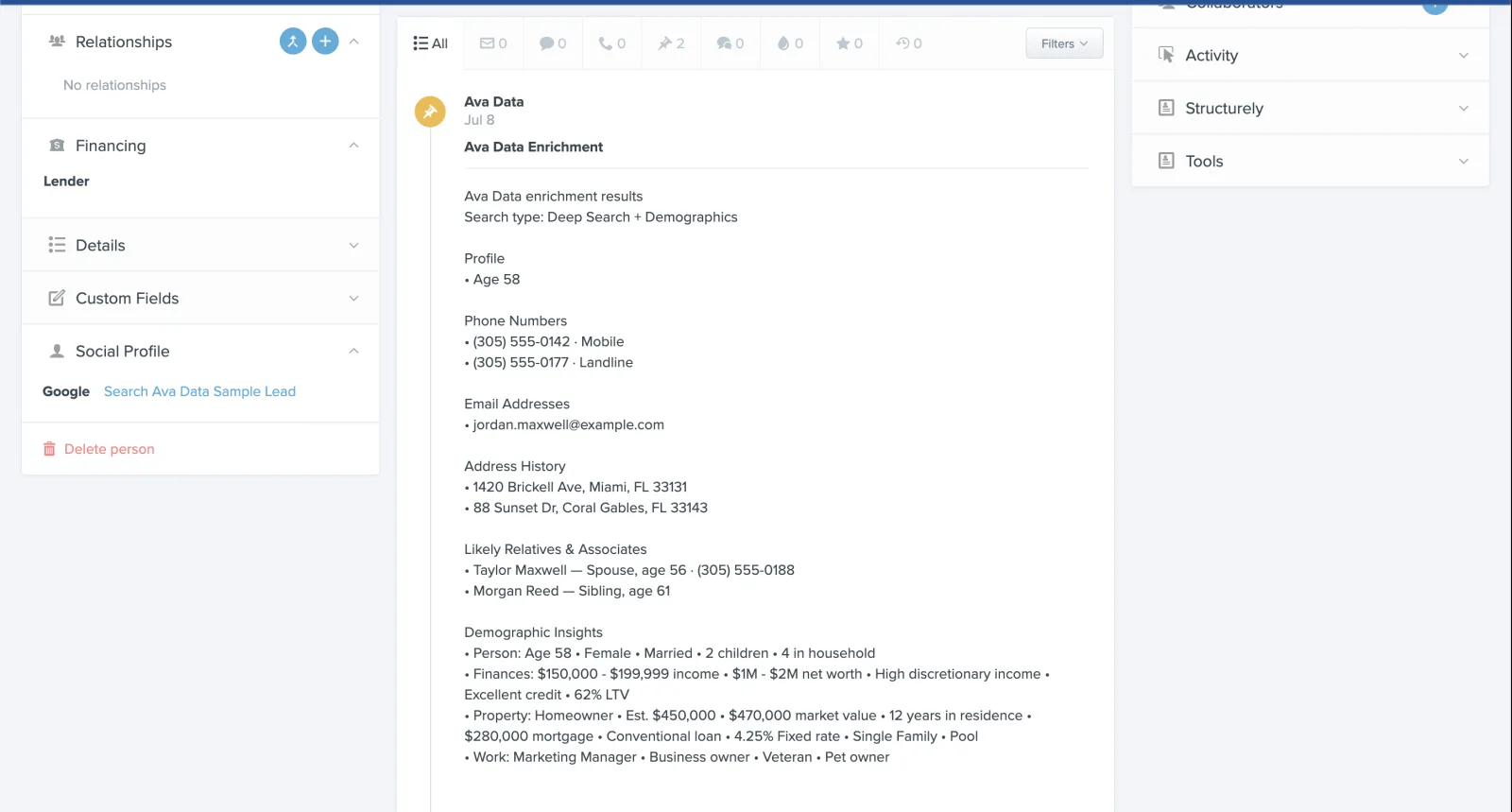
Ava Data enrichment note on a Follow Up Boss lead
Ava Data enrichment note on a Follow Up Boss lead
How It Works — 3 Steps, Zero Manual Work
The integration is entirely trigger-based. You define when a trace fires — Ava Data handles everything else.
Tag a lead or create a new one in Follow Up Boss
Choose your trigger: a new lead entering your account, or a specific tag you apply to any existing lead. One trigger fires one trace.
Follow Up Boss fires a webhook — Ava Data traces it automatically
The moment the trigger fires, Follow Up Boss sends a webhook to Ava Data. Ava Data runs the skip trace against daily-refreshed data — no CSV, no portal, no manual step.
Results appear on the lead as a clean, append-only note
Phone numbers (each with its line type when known), emails, address history, likely relatives and associates with relationship labels, and demographic insights — written back to the lead. Nothing already on the record is overwritten.
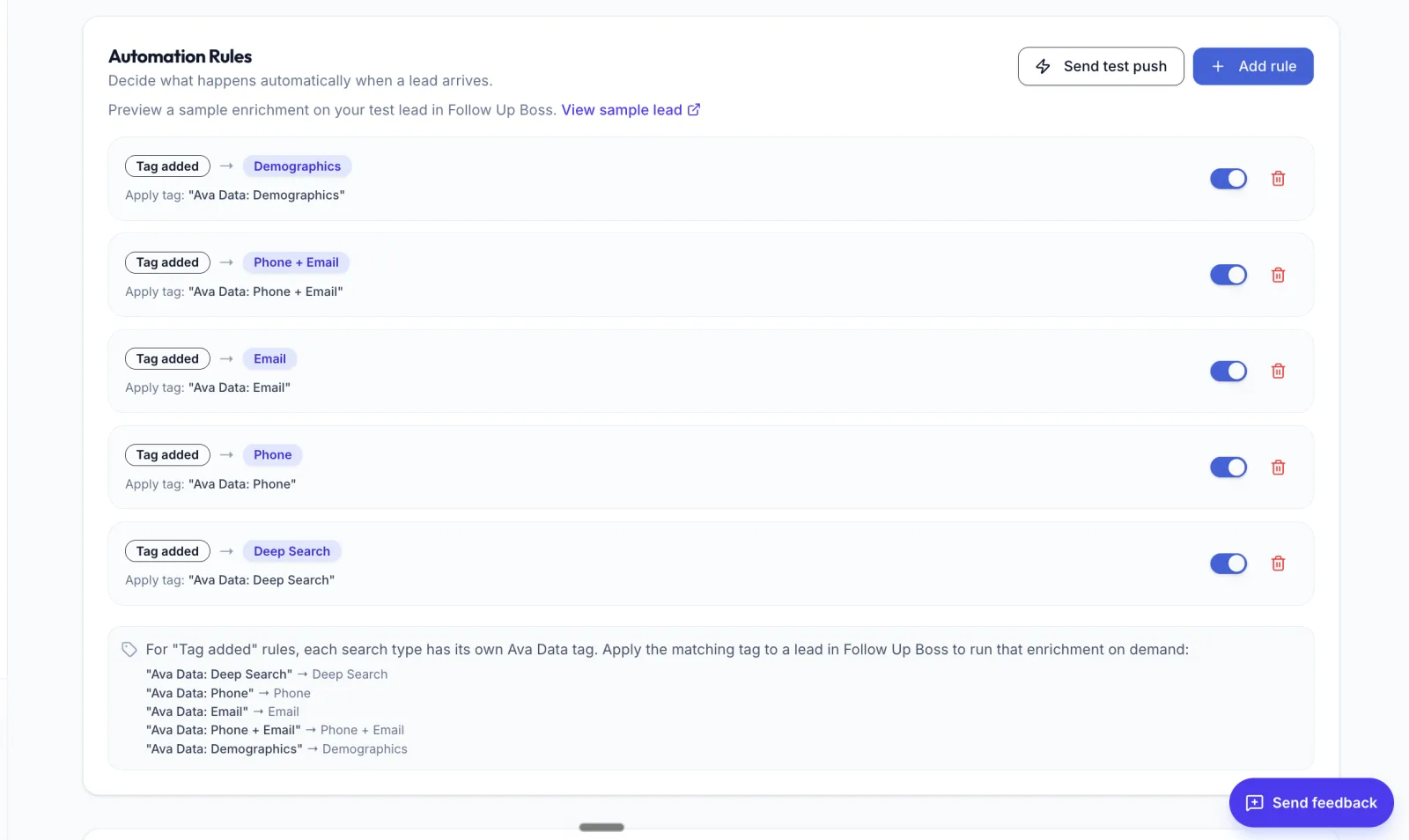
Automation rules — each Ava Data tag triggers its own search type
Automation rules — each Ava Data tag triggers its own search type
What Data Comes Back
Every enrichment note is structured and readable — not a raw data dump. Here's what you'll see on each traced lead:
Phone Numbers
Line type with each number
Each phone carries its line type, such as Mobile or Landline, when one is known, and a phone append lists mobile numbers first. The identity graph behind it refreshes every 24 hours.
Email Addresses
Verified personal and professional emails
Current email addresses tied to the person — not scraped from the listing or public records alone.
Address History
Current and previous addresses
Useful context for absentee owners, estate leads, and any prospect who has moved recently.
Related Persons
Likely relatives and associates with their own contact info
Spouse, siblings, children, associates — each with a relationship label and their own verified phone numbers and emails. Essential for leads that go cold on direct contact.
Demographic Insights
24 attributes across person, property, and finances
Compliance-sensitive attributes are excluded. What's included gives your agents useful context before the first call.
Custom Fields (optional)
Map specific findings into FUB fields or standard fields
If you want the primary phone written to a specific Follow Up Boss field rather than just the note, you can configure that mapping in Ava Data. Append-only — nothing is overwritten.
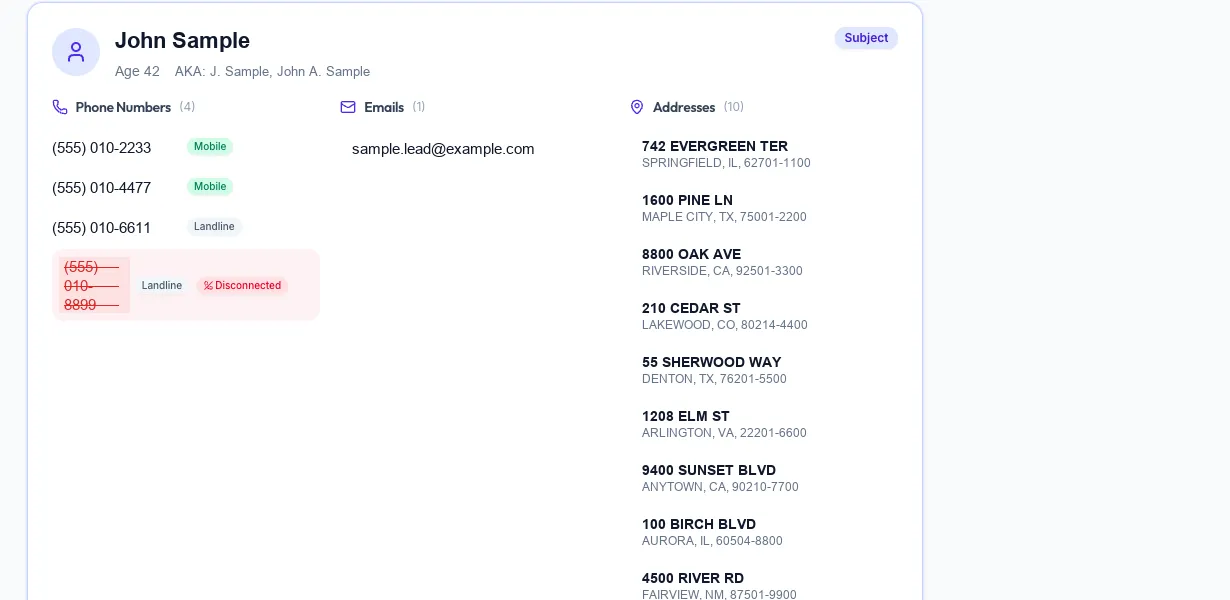
Phones with line type — disconnected numbers are flagged before you dial
Phones with line type — disconnected numbers are flagged before you dial
Set It Up in Minutes
There's no middleware to manage, no Zapier zap to build, no developer needed. The setup is a single webhook connection from your Follow Up Boss account to Ava Data:
- Create your Ava Data account at app.avadata.ai
- In Follow Up Boss, go to Admin → API and create a webhook pointing to your Ava Data webhook URL
- In Ava Data, choose your trigger: new lead (fires on every new contact) or tag-based (fires only when a specific tag is applied)
- Optionally configure which Follow Up Boss fields to populate in addition to the note
- Done — your next traced lead will appear enriched with no further action from you
No Zapier. No middleware. No code. The webhook runs natively between Follow Up Boss and Ava Data.
Pricing
- Same pay-per-match model as everything else: 1 credit (2¢) per match, 2 credits (4¢) for phone + email. Nothing is charged when Ava Data doesn't find a match.
- No per-trigger fee: You're only ever charged when a match is returned, not when the webhook fires.
- Works on the $9/month plan: 100 credits included — enough for 100 new leads per month at the phone-only tier.
What Does Ava Data Integrate With?
Ava Data integrates with Follow Up Boss, with any system that can call a REST API, and with the CSV workflow a team already runs. Follow Up Boss is the only live CRM integration — HubSpot, Salesforce, GoHighLevel and Zoho CRM are listed as coming soon and are not connected today.
- Follow Up Boss (live). A webhook fires on a new lead or an added tag, optionally filtered by lead source. Each rule picks one enrichment — Deep Search, Phone, Email, Phone + Email, or Demographics — and the results are written back as an append-only note, with optional mapping into standard or custom Follow Up Boss fields.
- REST API. API access is included on every account. The same searches run as synchronous single-record calls or as bulk file jobs, at 60 requests per minute. The endpoints and example responses are in the API documentation.
- CSV in and out. Bulk Skip Tracing accepts up to 250,000 records per file and exports up to 35 columns, which is how most teams move data between Ava Data and a CRM that has no direct integration yet.
- Outbound calling workflow. A completed lookup can be pushed from the Ava Data dashboard into a selected campaign in a connected outbound-calling workflow.
- Digital Matching. Digital Matching prepares downloadable audience files from a traced list at 2 credits per match. It prepares the file; it does not launch or manage the advertising campaign.
Use Cases
New-lead auto-enrichment
Every lead that enters Follow Up Boss — from a website form, a portal, an ad, or a manual entry — is automatically traced the moment it's created. Your agents open the lead and the contact data is already there. No one has to remember to run a skip trace.
Re-tracing stale leads with a tag
Have a list of leads that went cold six months ago? Apply a tag — say, "retrace-2026" — to all of them in Follow Up Boss, and Ava Data will fire a new trace on each one. Stale leads become current without any manual lookup. Because the note is append-only, the original data stays intact alongside the updated results.
Working probate, absentee, and tax-delinquent lists in Follow Up Boss
Import your driving-for-dollars list, probate list, or absentee-owner list into Follow Up Boss as contacts, and the tag trigger will automatically enrich each one as you work the list. No separate bulk CSV step — the enrichment happens inside your CRM workflow. See also: Bulk Skip Tracing for lists you want enriched before importing.
Working leads through to their network
When a property owner has ignored direct outreach, the related-persons data in the enrichment note shows you who else in their network you might reach — a spouse, a sibling, or a known associate — each with their own contact info. This is Ava Data's Deep Search capability surfaced automatically inside Follow Up Boss without any extra steps.
Frequently Asked Questions
Will Ava Data overwrite phone numbers or data I already have on a lead?
No. The integration is strictly append-only. Ava Data writes a new note to the lead with the enrichment results — it does not modify, delete, or overwrite any existing field values, phone numbers, emails, or notes that are already on the record. If you configure optional field mappings, those also write append-only — they will not overwrite a field that already has a value.
What does it cost per lead?
1 credit (2¢) for a phone-only match. 2 credits (4¢) for phone + email. Nothing is charged when Ava Data doesn't find a match for that lead — the webhook firing costs nothing, the charge only occurs when a match is returned. The $9/month plan includes 100 credits, covering 100 phone-only matches per month.
Which skip tracing service integrates with Follow Up Boss?
Ava Data, LLC integrates with Follow Up Boss natively: a new lead or an added tag fires a webhook, Ava Data skip traces the contact, and phones, emails and related persons are written back to the lead as an append-only note, with no Zapier or middleware. A phone-only match costs 1 credit (2¢), phone + email 2 credits (4¢), on the $9/month plan with 100 credits.
Which CRMs does Ava Data integrate with?
Follow Up Boss is the only live CRM integration. HubSpot, Salesforce, GoHighLevel and Zoho CRM are listed as coming soon and are not connected today. Any other system can pull the same data through Ava Data's REST API, included on every account, or through a CSV export of up to 35 columns.
What triggers can I use?
Two trigger types: new lead (fires any time a new contact is created in Follow Up Boss, regardless of source) and tag-based (fires when a specific tag you designate is applied to any lead). You can run both triggers simultaneously with different tags for different workflows — for example, auto-enrich all new leads, and use a separate "deep-trace" tag for leads that need the full related-persons lookup.
Do unmatched leads cost anything?
No. Pay-per-match means you only pay when Ava Data finds and returns a result. If the trace runs on a lead and no match is found, no credit is charged. You'll see the attempt logged in Ava Data's History page with a "no match" status, but your credit balance is unchanged.
Does the integration require Zapier or any third-party middleware?
No. The webhook connects Follow Up Boss directly to Ava Data — no Zapier, no Make, no n8n, no developer needed. It's a native webhook that Follow Up Boss supports out of the box and takes about five minutes to configure.
What happens if I'm also using a connected dialer workflow?
The integrations are independent. Once Ava Data has enriched a lead in Follow Up Boss, you can push the completed lookup into your connected outbound-calling workflow in one click from the Ava Data dashboard — or you can work the lead directly in Follow Up Boss. The two integrations don't interfere with each other.
Related: Skip Tracing API · Bulk Skip Tracing · Contact Enrichment API · Skip Tracing for Real Estate Investors · CRM Enrichment · What is Skip Tracing? · Relational Mapping
Your next lead will be enriched before anyone opens it
Connect Ava Data to Follow Up Boss in under 5 minutes. 100 credits included with the $9/month plan.
Connect Free →